Digital Tamers
Server Log in Register

Patch notes

Digital Tamers goes online

The server is open to players.

Getting started

  • This website: create your account (e-mail or Discord), see your Tamers, unstuck a Tamer, change your password, rankings and the Digimon database.
  • The launcher installs and updates the game by itself. Download it from your dashboard; it checks your PC and downloads only what changed after an update.
  • Windows 7 SP1, 8.1, 10 and 11 (64-bit) are supported, with nothing extra to install.

New areas

  • Original DATS Center and Original Yokohama Village are back, with the new story campaign First Assignment and the parks around Yokohama. New Tamers start there.

Quests

  • Every quest text rewritten (about 3,000): every area, every dungeon and Digimon Maze floor, all Jogress chains, the tutorial and the event quests.
  • Every regular quest can be finished: quests that named monsters which no longer exist count the ones that spawn where the quest sends you, quest items that nothing dropped now drop, and event quests are only offered while their event runs.
  • Monster and item names match the official English ones.

Fixes

  • Party, friends, block list, whispers and trade work: party invites no longer freeze the game, whispers arrive readable, trade shows the right partner and items.
  • Personal and consignment shops open without crashing and show their name tag.
Level 180, new Digivolution levels and Auto-Hunt

Levels and EXP

  • Level cap 180 for Tamers and Digimon, with the official EXP curve and stat growth up to 180.
  • EXP from monsters within 35 levels: full EXP as long as the monster is within 35 levels of your active Digimon, nothing beyond that. Applies to every monster and every party member.
  • The Digimon EXP bar now shows your real progress (client and server use the same table).

Digivolution

  • Every line opens at the same levels: Champion 25, Ultimate 50, Mega 75, Burst Mode 100, Armor 35. The Digivolution window shows these levels.

Auto-Hunt

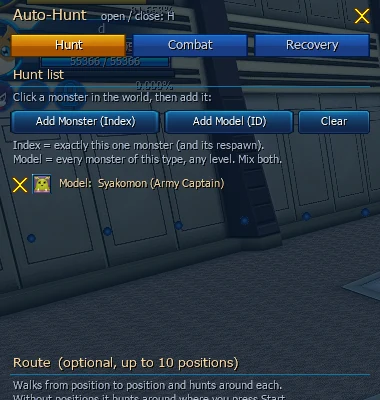
  • Press H to open the built-in Auto-Hunt: build a hunt list from monsters you click (up to 8, or empty to hunt anything nearby), up to 10 positions per map, choose skills per Digimon form, and set potions for HP, DS and X-Gauge. It leaves monsters other players are fighting alone and keeps running in the background. Outside bots stay against the rules.

Auto-Hunt window

Dungeons

  • Dungeon doors work like on the officials: each door opens when its boss falls, for everyone in the dungeon (Four Holy Beasts, Fanglongmon, Royal Base).
  • Royal Base knight rooms are reachable; three knights open the way to Center Royal Base.
  • Faster respawns: normal monsters come back about 3 seconds after they die. Bosses unchanged.

Fixes

  • Creating or belonging to a guild no longer crashes the game at login.
  • Entering about two dozen maps with a damaged sky (Infinite Mountain Dungeon, X-Evolution, Seven Devil dungeons and more) no longer crashes the game.
  • Boss announcements for bosses the client can't show are skipped instead of crashing.
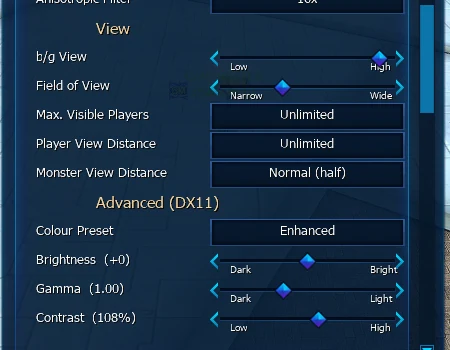
  • The launcher got Settings > Graphics with every in-game graphics option plus borderless mode.

Quality of life

Combat

  • Revive on the spot: the death window has a Revive button. For 1 Tera your Tamer and Digimon come back at full HP and DS where they fell.
  • Jogress with any partner leading, for Jogress and X-Jogress.
  • Aggressive monsters attack again (8 s pause after they give up).

Travel

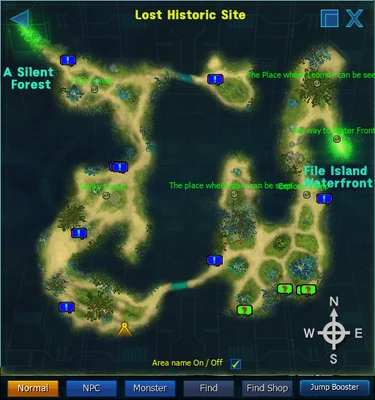
  • Click the zone map to walk anywhere; your Tamer uses teleport NPCs and portals on the map when that's faster. Works while riding.

Zone map walking

  • Jump Booster to every field map, visited or not. Dungeons excluded.
  • Char Select in the options menu takes you straight to your character list.

Shop

  • Masters Membership starts when you buy it (7, 30 or 60 days), with its buffs. Missing buffs come back at login.

Fixes

  • No lag while looting: a pickup used to re-save the whole inventory and the map waited for it. Only changed slots are saved now.
  • Enter confirms deleting an item.
  • Opening the Digimon archive no longer freezes the game.
  • Quest texts rewritten for the Server Continent, the Digital World, Shibuya and Verdandi Terminal.

The 64-bit DirectX 11 client

Client

  • A new 64-bit DirectX 11 game client, built from the game's source: more memory headroom and modern graphics.
  • Modern graphics options: render scale, FXAA, sharpening, bloom, ambient occlusion, better shadows, colour grading, HDR, depth of field, sun shafts, fog, outlines, VRR and low-latency modes, performance overlay. Everything is off by default, so the original look stays until you turn it on.
  • Higher frame rate: characters and map objects are drawn in batches. In a crowded Lost Historic Site about 108 fps instead of 60.
  • Smooth camera: right-drag rotation no longer jumps.

Graphics options

Quests

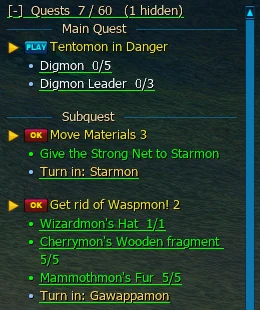
  • Hold up to 60 quests.
  • Better quest tracker: show/hide is remembered per quest, the header shows "Quests N/60" and folds, finished quests say where to turn them in, objectives are shown as coloured bullets.

Quest tracker

Fixes

  • Cash storage always shows your purchases. If it's full (49), the item goes to your inventory.

Boxes, scanning and loot

Boxes and scanning

  • Box opening with a reward list. Right-click a box to see every reward with amount and chance. Open any number from the stack at once, no 100 limit. If the rewards don't fit, nothing is used.

Box opening window

  • Modern item scanning. Official-style scan window with a 7×2 grid, Auto loads every scannable stack and Skip scans whole stacks at once.

Accessories

  • Option locks: lock up to all but one option. Cost per roll: 1 / 2 / 5 / 8 / 10 / 13 stones for 0 to 5 locks. Digivices still can't be locked.
  • No renewal counts: roll as long as you have stones. The window shows the option pool with min, max and chance and compares before and after.

Loot

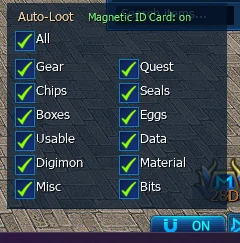
  • Auto-loot rules: quest items always go straight into your bag. With a Magnetic ID Card everything does, limited by your filter.
  • Magnet button and loot filter at the bottom right (Gear, Chips, Boxes, Usable, Digimon, Misc, Quest, Seals, Eggs, Data, Material, Bits). Saved on the server, so it follows you to any PC.
  • Drops stay on the ground for 5 minutes and belong to the killer for the first 60 seconds.

Magnet button and loot filter

Cash shop

  • Every product can be bought again (all 805, prices match the server). The old client marked most of them as "sale ended".

Quests

  • Quest texts rewritten, starting with Yokohama and File Island: real sentences, no cut-off text, correct names and counts.

Seals and timed items

Seals

  • Every Digimon drops its own seal (1–3, 25% chance) on every map where it spawns.
  • The Seals tab shows Seal Master style cards with art, how many you own, the bonus per grade and stat filters. Right-click a card to use the seal.

Items

  • Expired items are never deleted. An expired item stays where it is, you get a popup naming it, and it stops giving stats. You decide when to throw it away.
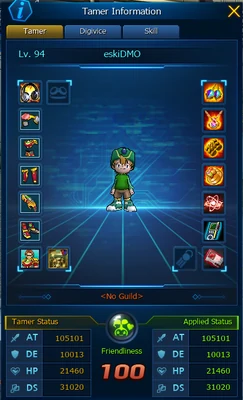
  • Magnetic ID Cards go into their own slot in the Tamer window.

ID card slot in the Tamer window

Fixes

  • Very high stats no longer break. Attack, HP and the other stats used to wrap around at 32,767: strong gear did 1 damage and healing showed wrong numbers.

Inventory overhaul

The inventory, the biggest everyday change, got rebuilt from the ground up.

Inventory

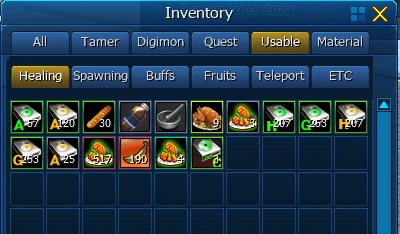
  • 28 sub-tabs, each its own bag. Gear, Chips, Scan, Return, Eggs, Data, Seals, Quest, Healing, Crafting and more no longer use inventory slots. New items land in All; press Sort to move everything into its tab and merge stacks.
  • Item search in the inventory (searches every tab) and in the warehouse (non-matching items are dimmed, so your layout stays).
  • Stacks of 9999 for every stackable item, attribute items included.
  • About 3,200 missing items added. Items the old client showed as "Unknown item" now have names and icons.

Inventory sub-tabs

Quests

  • Click an objective to walk there. Your Tamer walks to the NPC, monster area or region by itself, even through portals on other maps.

Fixes

  • Equipment only gives stats once you meet its level requirement.
  • Many client crashes, freezes and disconnects fixed (network layer, inventory reloads, moving gear between inventory and equipment).